本博客由科研AI Agent实验室BenszResearch强力驱动!如何更快地访问本站?有需要可加电报群获得更多帮助。本博客用什么VPS?创作不易,请支持苯苯!推荐购买本博客的VIP喔,10元/年即可畅享所有VIP专属内容!
VibeNotification 的 GitHub 仓库:
开发和调试不易,希望小伙伴们帮忙给项目点 Star、关注我的帐号呀!感谢感谢!
概览
- VibeNotification 1.1.0 用 Claude Code 与 Codex 的
Stophook,专门提醒一次完整主回复真正结束的时刻 - Codex 的旧
notify接入已降级为兼容方案;新配置请改用[[hooks.Stop]] - 新增
--doctor自检、Codex 会话退出 wrapper,以及 macOS 通知 sender 稳定性设置 - 本文同步了当前配置字段、环境变量、默认值与排错方法
前言
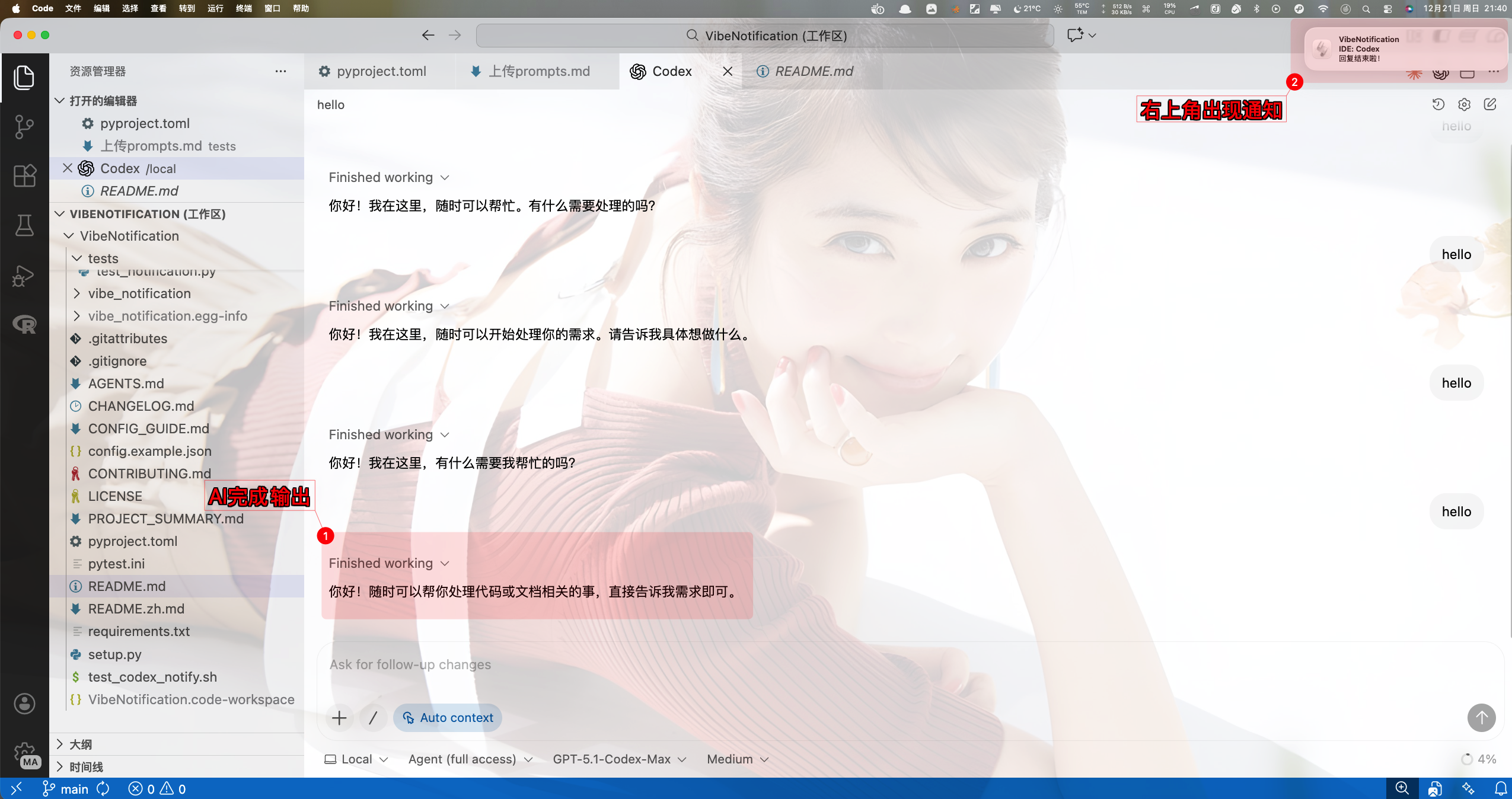
最近在用 Claude Code/Codex 跑长任务时,我希望他们工作时我可以做点别的事;等回复完成后再给个系统提示,我再过去查看结果。在 Play a sound when Codex finishes a prompt / task · Issue #3962 · openai/codex 的启示下,我折腾了个小工具——VibeNotification,能在 Claude Code/Codex 回复完成时弹系统通知+响铃。
这篇文章最初发布时,Codex 还是通过 notify 接入的;不过这套机制在长工具调用里容易把过程事件当作完成事件。现在 VibeNotification 已更新到 1.1.0,推荐用两个 CLI 都支持的 Stop hook,并针对 Claude Code 的工具调用、子代理、后台任务和重复事件做了过滤。下面按新方法重新配置一遍,小伙伴们别再照旧教程抄 notify 啦 (~ ̄▽ ̄)~
它现在是怎么提醒的
VibeNotification 是一个没有第三方 Python 依赖的轻量工具,支持 macOS、Linux、Windows。正常情况下,它在主代理本轮回复真正结束时发送系统通知和提示音;不是每调用一次工具就“滴”一声,也不因为子代理结束而刷屏。
Claude Code 的新版 agentic loop 里,Stop 可能出现在工具调用、子代理或后台任务之间。VibeNotification 会读取 hook 事件中的最终消息或 transcript,跳过仍在工作的中间停止、带 stop_hook_active 的重复链路以及未结束的后台任务;同一条最终回复也只提示一次。Codex 则推荐直接使用主代理 Stop hook,按 thread/turn 做幂等处理。
除了基础通知外,目前还提供交互式配置、音量/音色控制、中文或英文界面、macOS sender 模式,以及 --doctor 本机接入检查。对我来说最实用的还是:开着长任务去忙别的,听到提示再回来验收,终于不用在终端前罚站了,哈哈。
安装与首次自检
💡 需要 Python 3.7 或更高版本
还没有安装 Python 的话,可查看 Python 安装使用指南 或到 Python 官方下载页面 获取安装包。
安装稳定版
大多数小伙伴直接从 PyPI 安装即可:
python -m pip install -U vibe-notification
如果你想跟着源码调试或参与开发,再克隆仓库并以可编辑模式安装:
git clone https://github.com/huangwb8/VibeNotification.git
cd VibeNotification
python -m pip install -e .
虚拟环境不是必须的;介意污染 base 环境的话,可以先创建一个:
python -m venv venv
source venv/bin/activate
Windows PowerShell 则使用:
.\venv\Scripts\Activate.ps1
先发一条测试通知
安装后先别急着改 hook,运行:
python -m vibe_notification --test
预期结果是弹出一条系统通知并播放提示音。没有弹窗时,先看系统是否关闭通知、是否处于专注/勿扰模式;Linux 还要确认桌面环境提供了 notify-send,Ubuntu/Debian 通常可安装 libnotify-bin:
sudo apt-get install libnotify-bin
确认测试能工作,再配置 Claude Code 或 Codex,就不会把“hook 没触发”和“系统根本不让弹窗”混在一起排查了。
接入 Claude Code
把下面这段合并进 ~/.claude/settings.json 的 hooks 中:
{
  "hooks": {
    "Stop": [
      {
        "hooks": [
          {
            "type": "command",
            "command": "env VIBE_NOTIFICATION_SENDER_MODE=off python -m vibe_notification"
          }
        ]
      }
    ]
  }
}
如果这个文件已有其他设置或 hook,只合并 Stop 这一项,不要把整个 settings.json 覆盖掉。env VIBE_NOTIFICATION_SENDER_MODE=off 对 macOS 特别有用:它仅关闭通知对 VS Code、Terminal 等宿主 App 的 sender 绑定,让通知通常以 terminal-notifier 的身份显示;并不会关闭系统弹窗。
这里就用 Stop,不要把同一条提醒再挂到 SessionEnd 或 SubagentStop。前者是整个会话生命周期事件,后者只代表子代理结束,都不是“这一轮主回复已经可以验收”的可靠信号;VibeNotification 也会默认忽略它们,避免重复提醒。
配置后让 Claude Code 正常完成一次有工具调用的任务。只在最终回复出现时收到一次提醒,说明就接好了。
接入 Codex
新版 Codex 请在 ~/.codex/config.toml 中添加主代理 Stop hook:
[[hooks.Stop]]

[[hooks.Stop.hooks]]
type = "command"
command = "python3 -m vibe_notification"
timeout = 30
⚠️ Codex 必须先审核并信任这个 Hook,否则不会执行! 保存
config.toml后,请完全重启 Codex,在 Codex CLI 中输入/hooks,找到刚添加的Stophook,完成 Review/Trust。仅仅保证 TOML 语法正确、--doctor能识别配置还不够;未通过审核的非托管 command hook 会被 Codex 跳过,因此 VibeNotification 无法生效。以后只要修改了command等 Hook 定义,Codex 会按新哈希将它重新标记为待审核,也必须再次进入/hooks完成 Review/Trust。
它的含义是:本轮主代理停止输出时调用 VibeNotification。注意,这不等于整个 Codex 会话退出;你继续在同一个会话里追问,下一次主回复完成还会再提醒一次。
旧版教程里的:
notify = ["python3", "-m", "vibe_notification"]
现在不再推荐。旧 notify 的 agent-turn-complete 负载没有消息阶段,长任务中无法稳定分辨过程消息和最终答复;1.1.0 起 VibeNotification 会默认静默跳过它。请删除旧 notify,只保留上面的 Stop hook,避免同一个任务从两条通道重复进入。
如果你的 Codex 太旧、确实不支持 hooks,才可以临时恢复兼容模式:
notify = ["env", "VIBE_ALLOW_LEGACY_CODEX_NOTIFY=1", "python3", "-m", "vibe_notification"]
不过它仍可能把长时间工具调用之间的过程 turn 误判为完成,不建议作为日常配置。必要时可用 VIBE_DEBOUNCE_COOLDOWN=30 调整兼容模式的静默秒数。
只想在 Codex 整个会话退出时提醒
如果你要的是“我退出 Codex 后再提醒一次”,别用 Stop hook,直接用内置 wrapper 启动:
python -m vibe_notification --wrap-codex
平时带给 Codex 的参数也能原样透传:
python -m vibe_notification --wrap-codex -- -C /path/to/project
嫌长的话,往 ~/.zshrc 或 ~/.bashrc 加一个别名:
alias codexn='python3 -m vibe_notification --wrap-codex --'
重新打开终端或执行 source ~/.zshrc 后,用 codexn 启动就行。这样只会在 Codex 进程真正结束时通知一次。
配置通知行为
交互式配置与优先级
默认配置文件是 ~/.config/vibe-notification/config.json。不想手改 JSON 的话,运行:
python -m vibe_notification --config
向导会让你选择中文或英文,并可以依次设置声音、系统通知、日志级别、通知超时、音色和音量;按 Enter 保留当前值,按 Esc 退出。
声音、弹窗和日志级别的优先级是:命令行参数 > 环境变量 > config.json > 内置默认值。音量、音色、语言和 sender mode 没有对应的 CLI 参数,所以环境变量优先于配置文件。下面是当前可用的配置示例:
{
  "enable_sound": true,
  "enable_notification": true,
  "notification_timeout": 10000,
  "sound_type": "Glass",
  "sound_volume": 0.1,
  "log_level": "INFO",
  "detect_conversation_end": true,
  "language": "zh",
  "macos_sender_mode": "auto"
}
其中 notification_timeout 目前还是保留字段,macOS、Linux、Windows 的系统通知后端不保证按这个毫秒数自动收起;实际停留时间主要由系统通知样式、通知中心和专注模式决定。detect_conversation_end 建议保持 true。
常用临时设置
想只对一条 hook 命令生效,就把环境变量写在命令前面。比如 Codex 的 command 可以这样改:
# 只弹窗,不响铃
command = "env VIBE_NOTIFICATION_SOUND=0 python3 -m vibe_notification"

# 只响铃,不弹窗
command = "env VIBE_NOTIFICATION_NOTIFY=0 python3 -m vibe_notification"

# 低音量的 Ping
command = "env VIBE_NOTIFICATION_SOUND_VOLUME=0.2 VIBE_NOTIFICATION_SOUND_TYPE=Ping python3 -m vibe_notification"

# 排错时输出更详细的日志
command = "env VIBE_NOTIFICATION_LOG_LEVEL=DEBUG python3 -m vibe_notification"
Claude Code 也是同样思路,把 command 改为:
"command": "env VIBE_NOTIFICATION_SOUND=0 VIBE_NOTIFICATION_SENDER_MODE=off python -m vibe_notification"
常用变量有这些:
| 变量 | 可用值 | 用途 |
|---|---|---|
VIBE_NOTIFICATION_SOUND |
0 |
临时关闭提示音 |
VIBE_NOTIFICATION_NOTIFY |
0 |
临时关闭系统弹窗 |
VIBE_NOTIFICATION_SOUND_VOLUME |
0.0–1.0 |
覆盖音量,超出范围会自动截断 |
VIBE_NOTIFICATION_SOUND_TYPE |
Glass、Ping、Pop、Tink、Basso | 覆盖提示音类型 |
VIBE_NOTIFICATION_LOG_LEVEL |
DEBUG、INFO、WARNING、ERROR | 覆盖日志级别 |
VIBE_NOTIFICATION_LANGUAGE |
zh、en | 覆盖界面语言 |
VIBE_NOTIFICATION_SENDER_MODE |
auto、off、force | 控制 macOS sender 绑定 |
音色以 macOS 的 Glass、Ping、Pop、Tink、Basso 为准;Linux 会调用系统默认音频后端,Windows 会映射到相近的系统音。测试某一种声音,直接这样跑:
VIBE_NOTIFICATION_SOUND_TYPE=Ping python -m vibe_notification --test
VIBE_NOTIFICATION_SOUND_VOLUME=0.3 python -m vibe_notification --test
macOS 没有横幅怎么办
macOS 下,通知“进了通知中心却没有横幅”常常不是程序没执行,而是 sender 绑定到了 VS Code、Terminal 等宿主 App 后,被那个 App 自己的通知策略或专注模式压住了。先运行:
VIBE_NOTIFICATION_SENDER_MODE=off python -m vibe_notification --test
若这样能显示,就把 VIBE_NOTIFICATION_SENDER_MODE=off 固定到 Claude Code/Codex 的 hook 命令里。接着到“系统设置 > 通知”检查当前生效的应用是否允许通知、样式是否设为横幅/提醒,并确认没有开启专注模式。off 只是不用宿主 App 作为 sender,绝对不是禁用通知;真正关闭弹窗用的是 VIBE_NOTIFICATION_NOTIFY=0。
验证与排错
最省事的总检查是:
python -m vibe_notification --doctor
它会检查 Claude Code、Codex、项目安装情况和本机通知后端,能很快看出是不是还残留旧 notify、没配置 Stop hook,或者系统缺少通知能力。需要看更详细的运行信息时,再用:
python -m vibe_notification --log-level DEBUG --test
如果 --test 正常,但实际任务没有提醒,按下面的思路看就好:Claude Code 检查 ~/.claude/settings.json 是否为合法 JSON、Stop 是否写在 hooks 里;Codex 除了检查 ~/.codex/config.toml 是否只有推荐的 [[hooks.Stop]]、没有同时残留旧 notify,还必须在重启后输入 /hooks,确认该 Hook 已完成 Review/Trust。没有通过审核时,即使配置语法完全正确,Codex 也不会执行 Hook。如果测试本身都没有弹窗或声音,优先检查系统通知权限、专注模式、静音状态和 Python 是否指向安装了 VibeNotification 的环境。
FAQ
为什么 Codex 配了旧 notify 却没有提示?
这是 1.1.0 的有意调整。旧事件无法可靠辨别最终答复,默认静默跳过是为了避免长任务中途把你叫回来。请迁移到 Stop hook;只有旧 Codex 无法升级时才设置 VIBE_ALLOW_LEGACY_CODEX_NOTIFY=1,并接受它仍可能误报的限制。
为什么 Claude Code 有工具调用时没有连续响?
这是正常的。新版 Claude Code 会在 agentic loop 中多次触发 Stop,VibeNotification 会跳过工具调用中间状态、子代理、后台任务和重复事件,只保留本轮主回复真正结束时的一次提醒。
--test 能响,实际 hook 却不响?
测试命令只验证本机的通知链路;hook 还需要确认配置文件的位置、JSON/TOML 语法,以及 hook 命令中使用的 python/python3 是否就是安装本工具的解释器。对于 Codex,还要重启后进入 /hooks 完成 Review/Trust;这是必需步骤,未审核的 Hook 不会运行。虚拟环境用户尤其要留意这一点。
Linux 没有弹窗怎么办?
确认桌面会话可用且存在 notify-send。Ubuntu/Debian 可安装 libnotify-bin;声音部分还依赖 paplay 或 aplay 等系统音频命令。--doctor 可以先帮助定位缺哪一环。
小结
现在这套通知系统的重点已经不是“收到一个事件就响”,而是尽量只在 Claude Code 或 Codex 的主回复真正结束时叫你回来。安装后先用 --test 验证系统通知,再分别把 Claude Code 和 Codex 接到 Stop hook;若只关心整个 Codex 会话结束,则用 --wrap-codex 启动。音量、音色和 macOS sender 都能按习惯微调。这样跑长任务时就可以放心切去做别的事,听到提示再回来验收结果,舒服多了 (~ ̄▽ ̄)~ 有问题的小伙伴欢迎到 GitHub 仓库 提 Issue 或 PR,博客评论区留言也没问题!
---------------
完结,撒花!如果您点一下广告,可以养活苯苯😍😍😍